


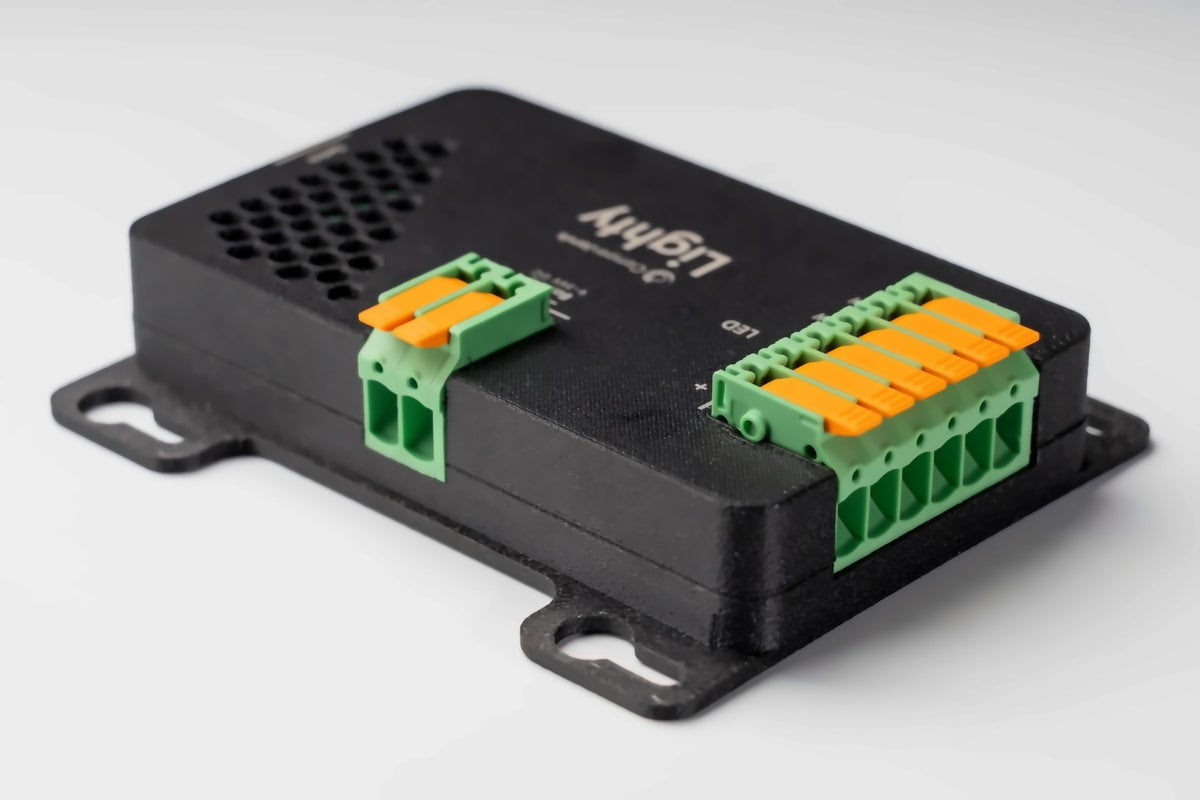
Lighty at a glance

Dims down to 0.1%
Real night light, true to colour all the way down. Most dimmers give up at 20%.
Completely flicker-free
Calm for your eyes and no banding in photos or video, even at 240fps.
Silent and pet-friendly
No whine, even at low brightness. Pleasant for you and your pets.
Digital fuse
Electronic fuse with current measurement, plus protection against over-temperature, over-voltage and reverse polarity.
Colour and white light
Every colour with RGBWW strips, or white light from warm to cool.
5 freely assigned channels
One coloured strip or up to five separate lights, each on its own.
Wall push buttons built in
Your wall push buttons switch and dim directly. A short press switches, holding dims.
Wireless push buttons
Häfele wireless push buttons paired in 20 seconds, ideal for retrofits. With the SmartKnob.
Consumption per light
Lighty measures and shows what each light draws, without an extra sensor.
From real builds
I think it's great that with Lighty and the small box I can control five different lighting circuits.
AndreasMotorhomeTranslated from German
Frequently asked questions about Lighty
What can I control with Lighty?
Lighty controls all the lighting in your camper over 5 independent channels. Everything is possible, from a single white strip to full RGBWW lighting with colour plus warm and cool white. Or you connect up to five individual lights, such as kitchen, bathroom, bed left, bed right and outdoor light, each on its own.
You set colour, colour temperature, brightness and entire light scenes just as you like.
Does Lighty work on 12V and 24V?
Yes, both without any changes. Lighty works in the range from 9 to 36V, so it is just as much at home in a 12V panel van as in a 24V motorhome.
Do I need a SmartKnob for Lighty to work?
Not necessarily. From firmware 0.4.7, a new Lighty responds to its push buttons straight away, without any setup. With Lighty Extension, each of the five push buttons switches its own channel. A short press switches, press and hold dims. With just one push button and no Lighty Extension, you switch channel 2.
Even if your SmartKnob ever fails, your push buttons keep switching and dimming.
The SmartKnob adds colours, white light (warm white and cool white as one light), scenes, the dashboard, automations, the wireless push buttons and the double tap for all lights.
How is Lighty connected, and what is in the box?
Connection is deliberately kept simple: power and light channels go into high-quality Phoenix lever terminals, almost tool-free, safe and reusable. You wire the push button to the supplied pluggable spring terminal connector and then simply plug it in.
In the box you will find Lighty, four mounting screws and the pluggable spring terminal connector for the push button.
Which LED strips work with Lighty?
Lighty controls single-colour and multi-colour LED strips with shared colour channels, meaning normal single-colour strips as well as RGB, RGBW and RGBWW strips.
Addressable pixel strips (such as WS2812), where every LED is controlled individually, are deliberately not supported. Lighty is not designed for them.
How many metres of LED strip can I connect?
What counts is not the length but the current: Lighty handles 20A in total. For example, a COB strip with 14W per metre draws about 1.2A per metre at 12V. Two strips of 3m each come to roughly 7A and fit easily. Several strips may also share one channel.
How do I operate my lights?
Any way you like: at the wall switch, on the SmartKnob or in the dashboard, all equal and in sync.
- A press switches on and off.
- Holding dims smoothly up and down.
- A double tap switches off all lights in the vehicle. That is your goodnight switch without any extra wiring; the SmartKnob needs to be running for it.
You can call up your light scenes from anywhere with a single tap, no app needed. On the SmartKnob, press in the main menu and the quick access to your scenes opens.
Can I keep using my existing switches?
Yes, wherever you only want to switch on and off, a normal switch is perfectly fine. You only need a push button where you want to dim directly at the wall, because dimming works by holding the button.
One thing to note: a switch goes directly on the push button input of Lighty, without Lighty Extension. As soon as you use Lighty Extension, only push buttons work. The Extension recognises the buttons via a resistor ladder, and a closed switch would block it. A mix of switches and Lighty Extension is therefore not possible.
Can I switch my lights with push buttons, and what does Lighty Extension add?
Yes. Lighty has one input for a push button. With Lighty Extension you can connect up to five push buttons, one for each light. Only push buttons go on Lighty Extension, no switches.
Without a SmartKnob, push button 1 switches channel 1, push button 2 channel 2 and so on. With the SmartKnob, you decide in the dashboard which push button switches which light. Then you can also use several push buttons for one light and do not need two-way switching.
How do I connect Lighty Extension?
Lighty and Lighty Extension are both marked IN and GND. Connect IN to IN and GND to GND.
The Extension then has the inputs 1, 2, 3, 4, 5 and GND. Each push button has two connections: one goes to an input, the other to ground, in other words negative (GND). For ground you can use GND on the Extension or any ground near the push button. Then one cable from the Extension to the push button is enough.
You will find a picture of this in the article "More push buttons with Lighty Extension".
Which push buttons can I use with Lighty?
A completely normal push button: single pole, normally open, without a latching position. Brand and design are up to you, we do not sell push buttons ourselves.
Only push buttons go on Lighty Extension, no switches. The Extension works with a resistor ladder: Lighty measures the voltage between 0 and 3.3V and recognises which push button is pressed. A switch stays closed and blocks this measurement.
Multi-gang push buttons with a common connection also work: the common connection goes to GND on Lighty Extension, the individual buttons to inputs 1 to 4. You can connect as many push buttons in parallel per channel as you like, for example one at the door and one by the bed. You can take ground right at the push button.
You will find the wiring diagrams in Connecting Lighty.
Can I use wireless push buttons, and which ones work?
Yes, together with the SmartKnob. Lighty receives battery-powered wireless push buttons from Häfele Connect Mesh. At the moment that is the Häfele Connect Mesh 4-way wall switch (item no. 850.00.141), from Lighty firmware 0.4.7. You can get it from Häfele specialist dealers. Next, we are adding the 4-way push buttons from Shelly.
You mount the push buttons wherever you like and pair them in the dashboard in around 20 seconds. A short press switches, a long press dims. You can also assign a button to any other device, such as the water pump or the inverter.
Important: the wireless push buttons only work while the SmartKnob is present. Your wired wall switches keep working without it.
Can I install several Lightys in my vehicle?
Yes. If five channels are not enough, you add a second Lighty, each with its own channels and its own push buttons. In the dashboard and on the SmartKnob, every light still appears as its own tile.
What makes Lighty's dimming special?
Lighty dims smoothly from 0.1 to 100%, colour-true all the way down. Most dimmers give up at around 20%; below that the light flickers or jumps to off. With Lighty it stays even. That makes a real night light, a subtle evening mood and even a sunrise simulation possible, where the light gently brightens over several minutes.
Lighty works completely silently and flicker-free, even with cameras up to 240fps. There is no whining, even at low brightness, and no stripes in photos or videos.
Does dimming interfere with the radio, pets or the vehicle electrics?
No. Lighty works at 19.5kHz, above what humans can hear, so there is no whining, even at low brightness. For pets there is practically no audible noise.
The channels switch with a time offset, so not all at the same moment. That puts a much more even load on your vehicle's electrical system.
On top of that, Lighty spreads its switching frequency slightly over a narrow range. This reduces electromagnetic interference in the vehicle, for example in radio reception.
How safe is Lighty for my electrical system?
Lighty protects itself and your wiring out of the box. Built in are:
- an electronic fuse with current measurement
- protection against overtemperature, overvoltage and undervoltage
- reverse polarity protection, in case plus and minus are ever swapped
- a surge arrester that catches short voltage spikes
All of it is adjustable. In total, Lighty switches up to 20A of combined load. And because Lighty measures consumption, the dashboard even shows you what each individual light draws, without any additional sensors.
Does Lighty remember my settings?
Yes. All settings stay stored in the device, even if you disconnect the power. When the power is back, the lights are off at first. When you switch on, every light comes back with the brightness and colour last stored via the SmartKnob. On a new Lighty, that is 100%. Lighty does not remember a brightness you only dimmed at the push button.
More questions? All answers in the knowledge centre or write to us.


